

















|
|
|
|
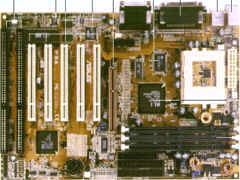
ASUS P5A (Preliminary Report) ASUS has made it to the Super 7 arena. It seems that ASUS has not forgotten about the general low spending crowd whom are still using the Intel Pentium MMX, AMD K6-2, Cyrix M2 and IDT Chips. Let's take a look at what this board offers : First Impression This board looks very much like it's brothers. e.g. TX97XE. They all have quite standard components like 3 DIMM slots, 512Kb Pipelined Cache, Serial and Parallel Connection, PS/2 Mouse and Keyboard connector, USB port etc. The difference is that this is the first board by ASUS that uses the ALi Aladdin V chipset, which supports 100Mhz FSB. The other thing that I noticed is that this board has 5 PCI Slots. It looks like this is the trend towards no ISA slots. One day we might just have a board with 7 or 8 PCI Slot and 1 AGP Slot. For overclockers, you will have lots of fun with this board because ASUS still uses the traditional jumpers for setting voltages, clock multipliers and bus frequencies. Now let's take a look at some of the new features.
New features The Keyboard Power Up (ACPI) allows you to just touch the spacebar and your machine will spring to life. It is especially useful when you one first startup, just like you use the remote control on your TV. Next is the CPU External Clock Frequency. You will see 4 jumpers named FS0, FS1, FS2, FS3 that gives combinations of 60,66.8,75,83.3,95,100,105,110,115,120 Mhz for the CPU. The different combinations of the state of the 4 jumpers determine the FSB. As for clock multiplier, you have BF0, BF1 and BF2, so altogether you have many combinations to work with. e.g. 1, 1.5, 2, 2.5, 3, 3.5, 4, 4.5, 5 at 0.5 intervals. Voltage settings range from 2.0v to 3.5v at 0.1 intervals. ASUS officially supports the new Cyrix MII-333 Mhz, K6-2 350Mhz processors. So if you are die hard fan of Super 7, this board is a real tweaker.
13 September 1998 11:34 AM |